How to Create Book Covers Easily Online with Dreamina AI Image Generation?
The process of making a book cover was complicated and time-consuming. Authors often had to hire a designer, wait through multiple drafts, and spend more than expected on revisions. Today, artificial intelligence has significantly simplified that workflow. Content creators, self-publishers, and authors can generate book cover concepts online in minutes, making the early stages of cover design faster and more accessible. In motion pictures, AI enables you to make your story more polished with advanced features, such as Dreamina’s AI image enlarger, which expands your canvas creatively and retains clarity even when you scale the image for print or digital media.
AI does not replace the role of design expertise, but it offers a practical starting point. By quickly producing visual concepts, authors can explore ideas, refine direction, and reduce the time spent going back and forth before finalizing a cover.
In this article, you will discover how AI is revolutionizing book cover design, making it faster and more accessible for authors. Generate stunning concepts in minutes and refine your vision.
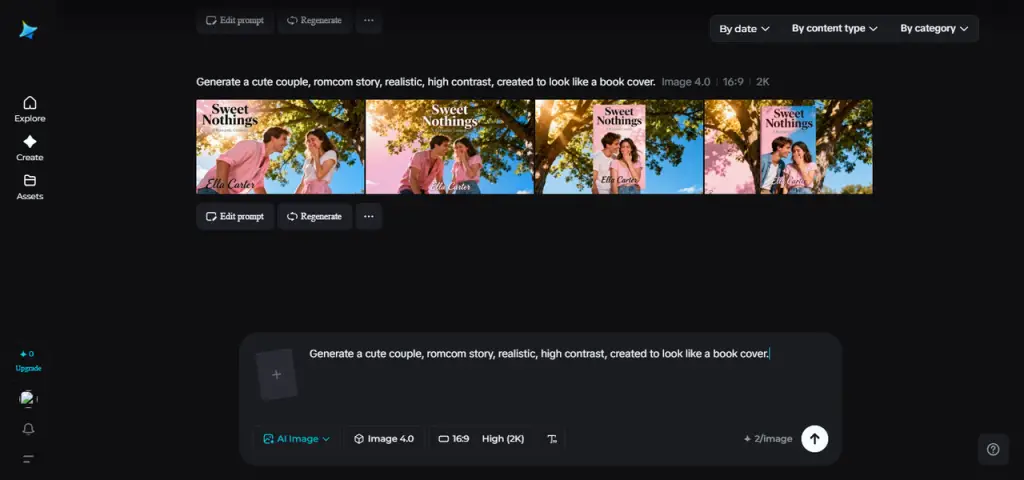
Table of Contents
The reason why covers captivate readers
A book cover is more than a decoration, it is a marketing tool. For many readers, the cover is the first interaction with a book, whether on an online bookstore, a social media feed, or a promotional ad. A strong cover communicates genre, tone, and professionalism at a glance.
Different genres rely on different visual cues. Romance covers often emphasize emotion and connection, thrillers lean toward contrast and tension, while non-fiction prioritizes clarity and symbolic imagery. When these elements align, the cover helps attract the right audience and encourages readers to explore further.
Exploring Visual Concepts with AI
One advantage of AI image generation is speed. Dreamina allows authors to create multiple visual variations in a short time, making it easier to test moods, styles, and compositions. This is especially useful for series or sequels, where maintaining a consistent visual identity helps strengthen author branding.
That said, AI-generated images are best viewed as concepts rather than finished products. Typography, text placement, and final print readiness still benefit greatly from human judgment. A designer’s eye is often essential for polishing layout, ensuring readability, and preparing files for publishing standards.
Turning Ideas into Images
Many authors feel intimidated by design because of its technical aspects, like lighting, composition, and proportion, can feel overwhelming. AI lowers this barrier by translating written descriptions into visuals, allowing authors to focus on creative direction rather than technical execution.
Dreamina works by interpreting text prompts, transforming ideas into images that can later be refined. The clearer and more specific the prompt, the closer the output aligns with the author’s vision.
Three Steps of Creating a Book Cover with Dreamina: A Simple Process
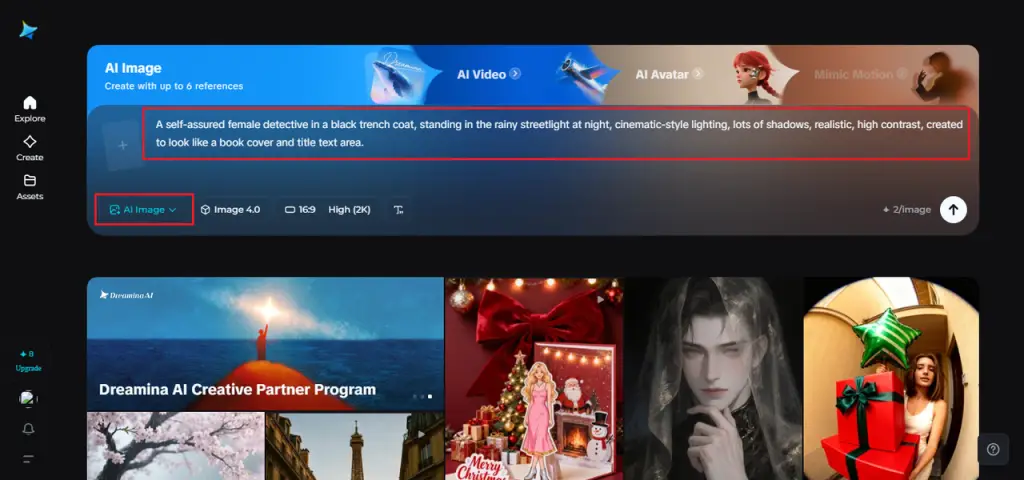
Step 1: Write a Text Prompt
Write a descriptive text prompt that describes your book, including the theme, genre, and book atmosphere. Use a human figure or any other applicable subject to ground the design. The less abstract you become, the closer an image created will resemble your own vision.
Sample prompt:
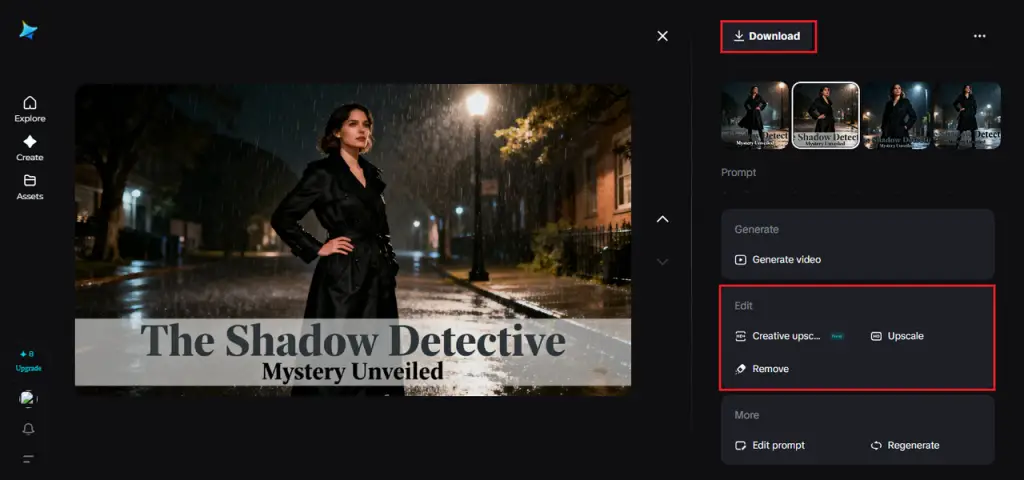
A self-assured female detective in a black trench coat, standing in the rainy streetlight at night, cinematic-style lighting, lots of shadows, realistic, high contrast, created to look like a book cover and title text area.
Step 2: Adjust Parameters and Generate
When your prompt is ready, select the parameters to fit your book format. Choose the model that best suits your preferred style, an aspect ratio that fits the size of your cover, the resolution of 1k (digital) or 2k (print), and a size that fits your platform. Once these settings are updated, click Generate icon and watch your book cover concept come to life in just a few seconds.
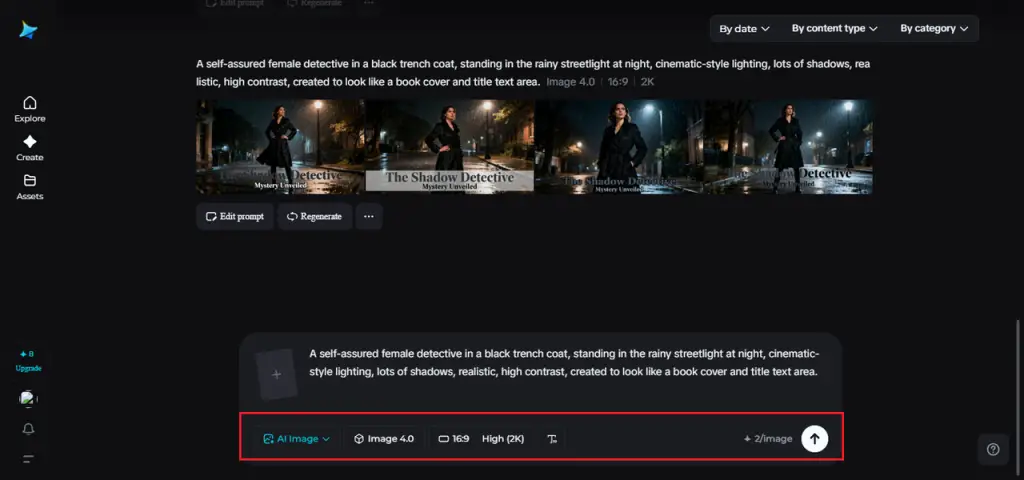
Step 3: Customize and Download
Once generated, Dreamina will give you the option to customise its AI and further design the image. It is possible to inpaint to correct tiny details, enlarge the image to have additional background, eliminate the undesired elements, and refocus the textures or facial features. After that, once you’re satisfied, you can save your final cover at the highest resolution as a downloadable icon, ready to publish or advertise.
The Visualization of Books into Video
The power of static book covers can also be applied to video, making them more engaging on social media. Dreamina allows authors to use its text to video generator to generate short promotional videos based on their cover design. The platform uses a text prompt or reference image to generate a video that highlights the theme, setting, or characters of your book. This ensures that ads, social media content, and trailers maintain a consistent look without the need to create entirely new material.
Efficiency with Creative Balance
The greatest benefit of AI tools is efficiency. Rather than using various tools, making several payments to the designer, or getting to know how complicated software works, you can create a concept and see it through to a finished cover in a relatively short period of time. Every prompt that you type is your own imaginative choice, and Dreamina converts your thoughts into visuals that remain high and clear.
This workflow enables the author to spend more time on writing and marketing while also creating an impression of a professional person.
However, AI works best as a creative assistant, not a complete replacement. Human judgment remains essential to ensuring the cover aligns with publishing standards, resonates emotionally, and accurately reflects the author’s intent.
Closing remarks: Professional within minutes
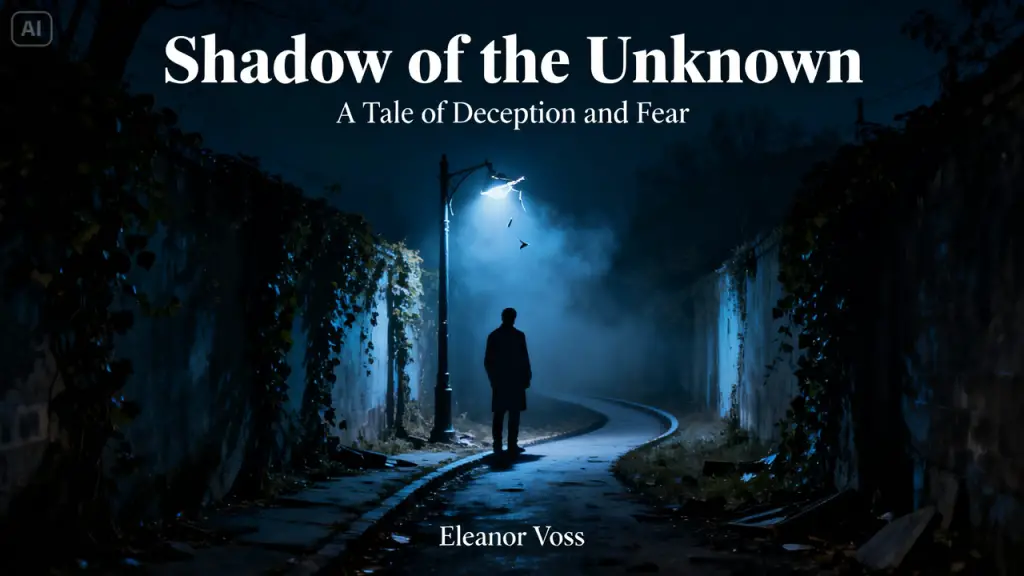
A book cover shapes a reader’s first impression. You can easily produce powerful, professional designs without tension and time loss with AI tools. Starting with creating a comprehensive prompt and continuing with editing the provided image and producing mini-video advertisements, the platform streamlines all required steps.
Dreamina will make sure that whatever you are self-publishing is a first-time novel, reviving an older book, or putting together a series, your visual identity is powerful, polished, and in sync with your story.
Related Article: How To Convert Handwritten Notes Into Digital Format?
Written by FilipiKnow

FilipiKnow
FilipiKnow strives to ensure each article published on this website is as accurate and reliable as possible. We invite you, our reader, to take part in our mission to provide free, high-quality information for every Juan. If you think this article needs improvement, or if you have suggestions on how we can better achieve our goals, let us know by sending a message to admin at filipiknow dot net
Copyright Notice
All materials contained on this site are protected by the Republic of the Philippines copyright law and may not be reproduced, distributed, transmitted, displayed, published, or broadcast without the prior written permission of filipiknow.net or in the case of third party materials, the owner of that content. You may not alter or remove any trademark, copyright, or other notice from copies of the content. Be warned that we have already reported and helped terminate several websites and YouTube channels for blatantly stealing our content. If you wish to use filipiknow.net content for commercial purposes, such as for content syndication, etc., please contact us at legal(at)filipiknow(dot)net