How to Get the New MySSS Card? Philippines’ newest government ID with built-in banking features.
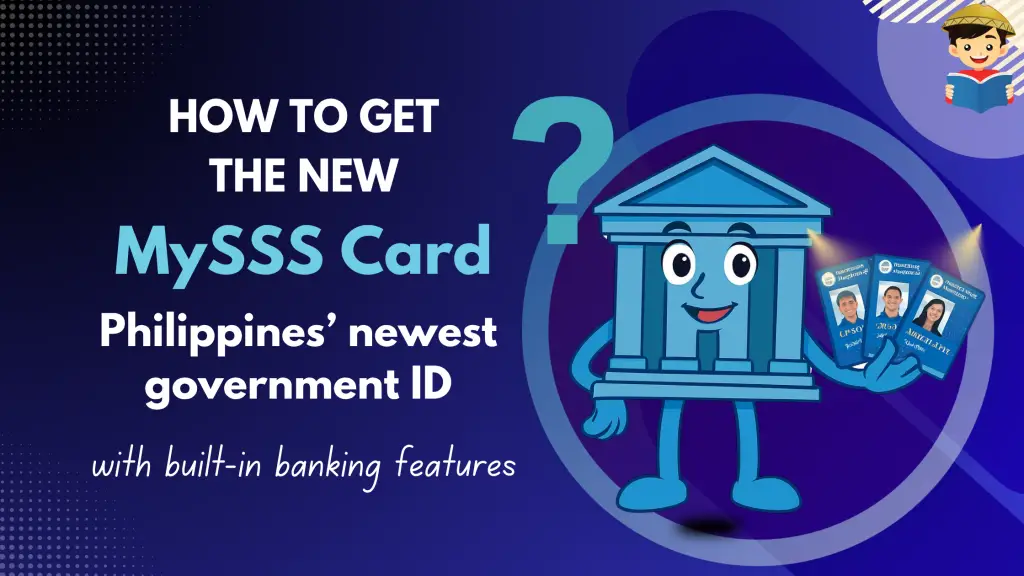
If you’ve been holding on to your old UMID card, it’s time for an upgrade. The Social Security System (SSS) has officially launched the MySSS Card — a brand-new card that works both as a valid government ID and a debit card linked to your own bank account. This guide walks you through everything you need to know, step by step.
In this article, you will discover the New MySSS Card: a dual-purpose government ID and debit card. It offers convenience, security, and easy access to your SSS benefits.
Table of Contents
What Is the New MySSS Card?
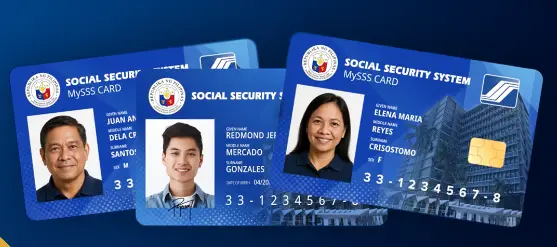
The MySSS Card is the latest official ID issued by the Social Security System (SSS) of the Philippines. But what makes it truly exciting is that it’s two things in one: a valid government ID you can use for transactions, and a working debit card connected to a real savings account.
That means your SSS benefits, loan proceeds, and pension payments go directly into the card’s linked account. No more running to a separate bank enrollment. No more waiting in long lines just to set up a disbursement account. The MySSS Card takes care of all of that for you automatically.
The card is equipped with an EMV chip and is integrated with the Philippine Identification System (PhilSys) eVerify, with biometric authentication built right in for extra security.
What Makes the MySSS Card Different?
| 🏦 Banking and SSS in One Automatically linked to your SSS account. Your benefits, loans, and pension go straight into the card. | 💳 Works Like a Debit Card Withdraw at ATMs, shop in stores and online, transfer funds, and pay bills right from your card. |
| 🔒 Strong Security Built In Uses biometric verification through your National ID (PhilSys), helping protect you from fraud and identity theft. | 📱 Full Mobile App Access Through partner banks like RCBC DiskarTech, you can check your balance, send money, pay bills, or lock your card anytime. |
Who Can Apply?
Good news! The card is open to most SSS members. Whether you’re an active contributor, a pensioner, or a beneficiary, you’re likely eligible.
Eligible Applicants
- SSS member with at least one posted contribution
- Pensioner (retired, disabled, or surviving)
- Individual claimant or beneficiary
- Representative payee
Basic Requirements Before You Apply
- You must have a permanent SS number
- You must have an active My.SSS online account
- Your contact details (address, mobile number, email) must be up to date in SSS records
- You must be registered with the National ID system (PhilSys)
| ⚠️ Important: Before you start your application, double-check that the name and birthdate on your SSS records match exactly with your National ID. A simple mismatch could delay or stop your application. Fix any discrepancies with the correct agency first. |
What Documents Do You Need?
The application is mostly paperless and done online. Still, it helps to have these ready before you start.
For the SSS Portal Application
- Active My.SSS account credentials (username and password)
- Updated personal information in your SSS profile
- Registered National ID (PhilSys) for identity verification
For the Bank Account Opening (KYC)
- A valid government-issued ID
- A selfie or biometric verification through the bank app
- Your MySSS Card Transaction Number, which you receive after completing the portal steps
Step-by-Step: How to Apply
The whole process is split into three main parts: start online with SSS, set up your bank account, then wait for your card to arrive.
I. Apply Through the My.SSS Portal
This is where it all begins. Go to my.sss.gov.ph and follow these steps:
- Log in to your My.SSS account at my.sss.gov.ph
- Under the Services menu, click on MySSS Card
- Review your personal details and update anything that’s outdated
- Agree to identity verification using the National ID eVerify system
- Complete the facial scan for biometric confirmation
- Choose your preferred partner bank (currently RCBC, with AUB, China Bank, EastWest Rural Bank, and UnionBank available)
- Agree to data sharing between SSS and the bank
- You’ll receive a confirmation message and a transaction number via email and your My.SSS inbox
II. Open Your Bank Account Through the Partner Bank App
After finishing the SSS portal steps, open a savings account with your chosen partner bank. Here’s how it works with RCBC:
- Download the DiskarTech app on your phone (available on Android and iOS)
- Register using your MySSS Card Transaction Number from Step 1
- Upload a photo of your valid ID and take a selfie for identity verification (the KYC process)
- Wait for the bank to review and approve your account
- Pay the card fee of around ₱200, which is deducted from your new bank account
III. Wait for Your Card to Arrive
Once your bank account is approved, your physical card will be produced and sent to you. You have two options:
- Home delivery to your registered address
- Branch pickup at your chosen bank’s nearest branch
Good news: once your account is approved, you can start receiving SSS benefit credits even before your physical card arrives.
How Long Does It Take?
Once your bank account is successfully opened and verified, here’s how long you can expect to wait for your physical card.
| 15 Working Days Metro Manila | 20 Working Days Outside Metro Manila |
| 💡 Your bank and SSS will send you email and My.SSS inbox notifications with status updates. For questions about your card’s delivery, contact your chosen partner bank directly. |
Frequently Asked Questions About MySSS Card
| Is the MySSS Card replacing the UMID card? |
| Yes. The MySSS Card is the modern replacement for the UMID, with added banking features. That said, your existing UMID remains valid for now, so there is no rush to surrender it. |
| Do I need to visit an SSS branch to apply? |
| No. Most of the application process is done entirely online through the My.SSS portal and the partner bank’s app. You only need to visit a branch if you prefer to pick up your card in person or if you run into issues during account opening. |
| Can I still apply even if I already have a UMID card? |
| Yes, absolutely. You can apply for the MySSS Card to replace or upgrade your existing UMID. Many members are doing exactly that to take advantage of the card’s banking features. |
| Can I receive SSS benefits before my physical card arrives? |
| Yes. Once your bank account is approved, SSS will link it as your main disbursement account. Benefits can already be credited even while you are still waiting for the card. |
| How much does it cost to get the MySSS Card? |
| There is a card issuance fee of around ₱200. This is typically deducted automatically from your linked bank account when the card is issued, so you do not need to pay in cash upfront. |
| What happens if my SSS records do not match my National ID? |
| Your application will be delayed or put on hold. You will need to update the incorrect records with the appropriate agency first, either SSS or the Philippine Statistics Authority (PSA), before you can proceed. |
| Which banks are currently partnered with SSS for the MySSS Card? |
| RCBC (through DiskarTech) was the first to roll out the program in October 2025. Other partner banks include Asia United Bank (AUB), China Bank, EastWest Rural Bank, and Union Bank of the Philippines. |
Quick Summary
| → The MySSS Card combines a government ID and a debit ATM card in one → It replaces the old UMID card and automatically becomes your SSS disbursement account → You can use it to withdraw cash, pay bills, shop online, and receive benefits → Apply online through My.SSS, then complete bank onboarding through the partner bank app → No need to visit an SSS branch for most of the process → Delivery takes 15 to 20 working days depending on your location → Card fee is around ₱200, deducted from your linked account |
References
Other Articles: How To Get SSS Number Online in the Philippines: An Ultimate Guide
Written by Joanne Borja
in Government Services, Identification, NSO/PSA, SSS, Technology

Copyright Notice
All materials contained on this site are protected by the Republic of the Philippines copyright law and may not be reproduced, distributed, transmitted, displayed, published, or broadcast without the prior written permission of filipiknow.net or in the case of third party materials, the owner of that content. You may not alter or remove any trademark, copyright, or other notice from copies of the content. Be warned that we have already reported and helped terminate several websites and YouTube channels for blatantly stealing our content. If you wish to use filipiknow.net content for commercial purposes, such as for content syndication, etc., please contact us at legal(at)filipiknow(dot)net